Android, iOS, and macOS apps: Manage usage restrictions
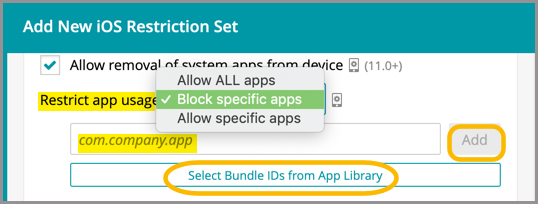
App usage restrictions enable you to Allow ALL approved apps, Block specific apps, or Allow specific apps. To select apps, an App Package ID is required. If the Package ID is known, these apps can be added manually in the field provided. If the Package ID is not known, the app can be selected from the App Library.
- Select the Libraries tab in top navigation.
- Select Restriction Sets.
- To create and configure a new restriction:
- To edit an an existing restriction:
- Select a Restrictions Set Name.
- In the right panel, click Edit.
- Under Store and Apps, make a selection from the Restrict app usage dropdown.
If allowing or blocking specific apps, enter an App Package ID or select an app from the library.
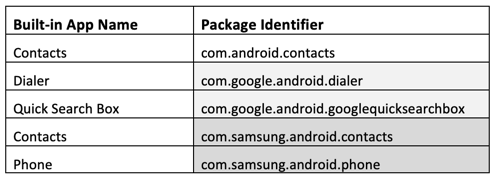
Android package IDs:
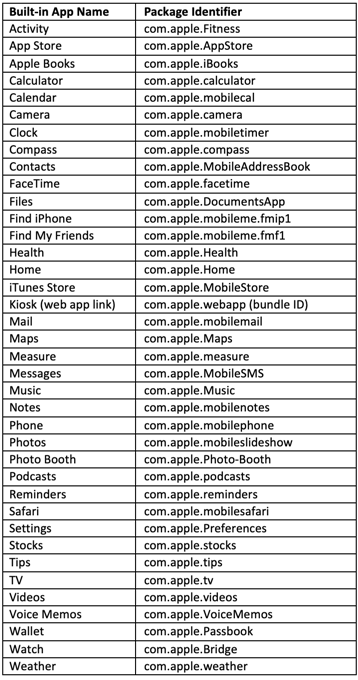
Apple package IDs:
- Click Update Restriction Set.
Restrictions that are configured to deploy upon enrollment may not appear in the inventory for impacted devices; however, the restrictions will be enforced on the device.